Download & releases.
A free Mac preview for Claude Code and Codex. No account, API key, or payment details required.
Purrvio 1.0-preview.8
3 November 2026 · macOS 13.0+ · Apple silicon and Intel
This build is locally signed and has not been notarized by Apple. It is intended for testing. macOS may block the first launch. It is not available through the Mac App Store.
SHA-256Available with the packaged release
What’s new
- Names the live terminal permission correctly on macOS 27 and earlier releases.
- Shows the system entry name for this build and how to refresh an existing grant.
- Rechecks permission when you return to Purrvio.
Next: install Purrvio.
Your browser handles the download. Once the ZIP is saved, follow the steps below. If it did not start, use Download free preview again.
Go to installation steps ↗Install your preview.
- Download and unzip.
Extract the preview ZIP and move Purrvio.app to your Applications folder.
- Open Purrvio.
If macOS blocks this development build and you choose to trust it, check System Settings → Privacy & Security for the app-specific Open Anyway option. Follow Apple’s instructions; you do not need to disable Gatekeeper.
Apple’s guide to opening Mac apps ↗ - Start an agent as you usually do.
Start a supported Claude Code or Codex session. Hover beside the notch to expand the panel, or use the menu bar to open the dashboard.
- Choose optional permissions.
Live terminal text needs access under System Settings → Privacy & Security → Device Control and Data Access (macOS 27) or Accessibility (earlier macOS). This build may appear as AgentManager. Automation enables supported terminal control. Full Disk Access may be needed for protected files. macOS notification permission is only needed if you opt into system banners.
Your agents, in sight.
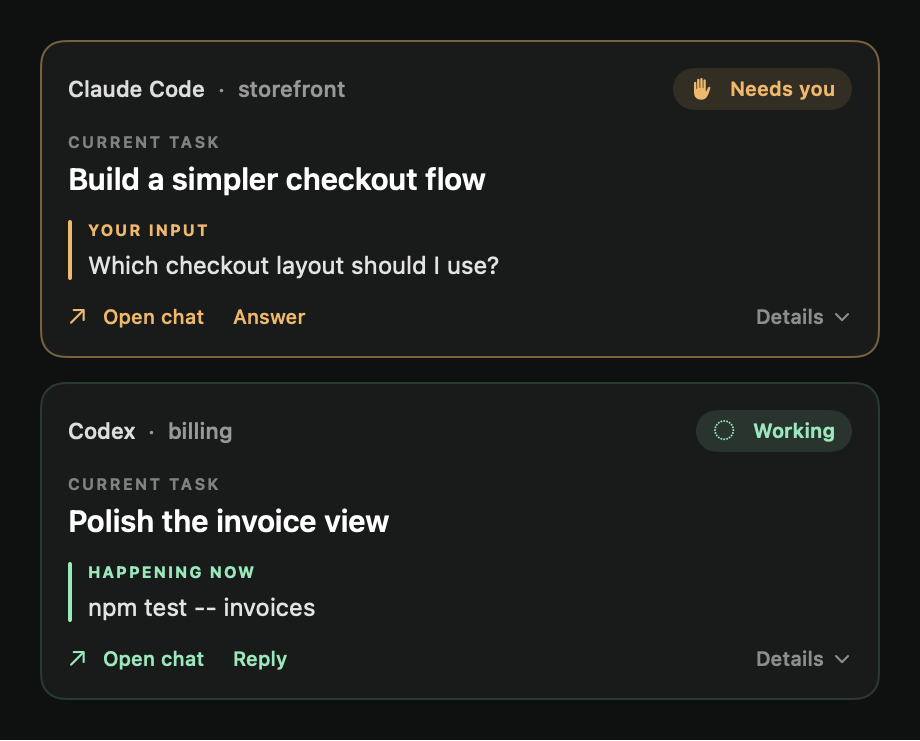
- A native notch panel and full dashboard for supported coding agents.
- Claude Code and Codex session context and input/completion notices.
- Navigation to existing Ghostty and Terminal.app sessions.
- Supported replies through Ghostty.
- Customizable companions, colors, motion, and display detail.
- Purrvio’s new name, icon, and visual identity.
Good to know
The preview supports Apple silicon and Intel Macs. Agent context and usage detail vary by tool and local permissions. Status updates follow the configured scan interval, five seconds by default. A completed turn means it is time to review the result; it does not guarantee task success.
Inside the native app.